Online or onsite, instructor-led live CAD (Computer-Aided Design) training courses demonstrate through hands-on practice how to use CAD in design.
CAD training is available as "online live training" or "onsite live training". Online live training (aka "remote live training") is carried out by way of an interactive, remote desktop. Onsite live CAD training can be carried out locally on customer premises in Nijmegen or in NobleProg corporate training centers in Nijmegen.
NobleProg -- Your Local Training Provider
Nijmegen
Fifty Two Degrees, Jonkerbosplein 52, Nijmegen, Netherlands, 6534 AB
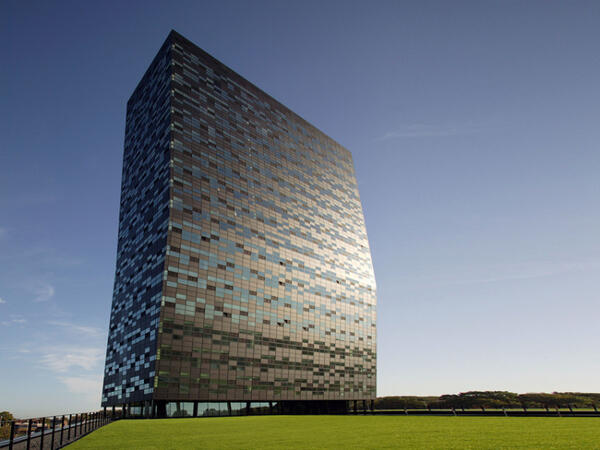
Located in FiftyTwoDegrees, a striking black tower of 18 floors with a 'kink' in the top that is at an angle and known as an unrivaled business address in the east of the Netherlands. FiftyTwoDegrees is designed as a unique business, cultural and social center and is a combination of high concentration of knowledge companies and well thought-out offices that are grouped around a central square
Wageningen
Wageningen WUR, Stippeneng 2 , Wageningen, netherlands, 6708 WE
Wageningen is located on the banks of the Lower Rhine. Excavations date to the first settlements in this area around the Stone Age. The hills to the east of the city offered protection from floods of the Rhine from the Bronze Age. The city has a turbulent history and has been occupied or destroyed several times. The Rhine also changed course in 1421, moved further south and therefore had an adverse effect on the Wageningen trade. In the 17th century, the city started growing tobacco and there were several cigar manufacturers. The floodplains of the Rhine to the south also had several brickworks, one of which can still be seen.
In 1876, the Dutch government decided to build the first agricultural school in Wageningen because it was in the heart of the country and surrounded by a wide variety of soils. Since then, the city has grown enormously and Wageningen University is now a world-famous Life Sciences university. Wageningen also has an important inland port.
The halls of Impulse
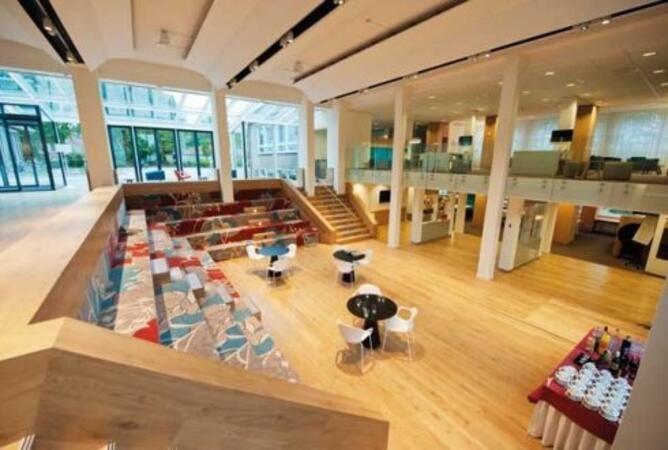
Centrally located on Wageningen Campus, near the De halen van Impulse. The glass building and the cheerful colors provide a welcoming atmosphere. Impulse is an excellent location for not too large symposia or training courses. Impulse is located in building 115 on the Campus.
Address Stippeneng 2
6708 WE Wageningen
Wageningen Campus is indicated at the main roads of Wageningen. Follow the P-route to P3 on the campus. The route is indicated from all large parking spaces to the individual buildings on the campus. Impulse's building number is 115.
Arnhem
Arnhem Park Tower, Nieuwe stationsstraat 20, Arnhem, Netherlands, 6811 KS
The Arnhem Nijmegen region is known as a conference destination and has a thriving food and health sector, thanks in part to the presence of two universities.
The Park Tower is located in a modern building on top of the train station in the center of Arnhem's business district. The railway connects the city to national and international cities. Moreover, Arnhem is close to the German border and is easily accessible due to the many train routes. From the 13th and 14th floors of the city center you have a view over the city and the World Trade Center is right next door.
ArchiCAD is a professional Building Information Modeling (BIM) software developed by Graphisoft, widely used for architectural design, documentation, and collaboration.
This instructor-led, live training (online or onsite) is aimed at intermediate-level to advanced-level architecture and BIM professionals who wish to master complex modeling techniques, automate workflows, and enhance collaboration using ArchiCAD’s advanced features.
By the end of this training, participants will be able to:
Use ArchiCAD’s advanced modeling and documentation tools efficiently.
Customize templates, attributes, and standards for large-scale projects.
Leverage teamwork, BIMcloud, and IFC workflows for multi-user collaboration.
Integrate automation, visualization, and performance optimization tools in ArchiCAD.
Format of the Course
Interactive lecture and discussion.
Lots of exercises and practice.
Hands-on implementation in a live-lab environment.
Course Customization Options
To request a customized training for this course, please contact us to arrange.
AutoCAD Plant 3D is a specialized CAD application for designing process plant facilities, providing tools for piping, equipment, and structural modelling as well as isometric and orthographic deliverables.
This instructor-led, live training (online or onsite) is aimed at intermediate-level to advanced-level CAD professionals who wish to create customized libraries and templates, integrate mechanical and structural elements, and implement advanced interference checking and conflict resolution workflows.
By the end of this training, participants will be able to:
Create and maintain customized templates for parts, equipment, and repetitive activities.
Modify and extend component libraries to meet project standards and workflows.
Produce isometric and orthogonal drawings and optimize templates for repetitive tasks.
Perform advanced interference checking and document conflicts and resolutions.
Format of the Course
Interactive lecture and demonstration.
Hands-on exercises in a lab environment using real project files.
Practical workshops focused on templates, library editing, and clash management.
Course Customization Options
To request a customized training for this course, please contact us to arrange.
This instructor-led, live training in Nijmegen (online or onsite) is aimed at intermediate-level to advanced-level SolidWorks users who wish to deepen their modeling skills, master advanced features, and improve design efficiency and accuracy.
By the end of this training, participants will be able to:
Create complex parts, assemblies, and configurations efficiently.
Use advanced modeling tools such as sweeps, lofts, and surfaces.
Apply design tables, equations, and parametric controls.
Perform simulations and motion studies to validate designs.
This instructor-led, live training in Nijmegen (online or onsite) is aimed at beginner-level electrical engineers and designers who wish to use AutoCAD to create professional electrical drawings and documentation.
By the end of this training, participants will be able to:
Understand the basics of electrical design and drafting using AutoCAD Electrical.
Learn to create and manage electrical schematics, panel layouts, and wiring diagrams.
Utilize AutoCAD Electrical's advanced tools and features to enhance productivity.
Apply best practices for electrical design and documentation.
This instructor-led, live training in Nijmegen (online or onsite) is aimed at beginner-level users who wish to explore the core functionalities of Solidworks PDM and its applicability to their organization's design file management requirements.
By the end of this training, participants will be able to:
Understand the key features and benefits of Solidworks PDM.
Navigate the Solidworks PDM interface and workflows.
Perform basic end-user tasks such as file check-in/check-out, versioning, and searching.
Explore administrative functionalities, including vault configuration, user permissions, and workflow customization.
Assess the potential implementation of Solidworks PDM across multiple company sites.
This instructor-led, live training in Nijmegen (online or onsite) is aimed at intermediate-level mechanical engineers and CAD designers who wish to use SolidWorks to design and implement industrial automation systems.
By the end of this training, participants will be able to:
Install and configure SolidWorks for automation design.
Design, simulate, and analyze industrial automation components and systems.
Export designs for real-world implementation in industrial settings.
This instructor-led, live training in Nijmegen (online or onsite) is aimed at advanced-level AutoCAD Plant 3D users who wish to use AutoCAD Plant 3D for complex plant design projects effectively.
By the end of this training, participants will be able to:
Use AutoCAD Plant 3D for complex and detailed plant design projects.
Understand the advanced features of AutoCAD Plant 3D, including custom component creation, advanced data management, and complex routing.
Manage large-scale projects and collaborate effectively with teams using different software tools.
Customize the software and automate repetitive tasks to meet specific project needs.
This instructor-led, live training in Nijmegen (online or onsite) is aimed at beginner-level to intermediate-level professionals in plant design and engineering who wish to gain and enhance their skills in using AutoCAD Plant 3D.
By the end of this training, participants will be able to:
Set up a development environment that includes AutoCAD Plant 3D.
Create detailed 3D plant models and layouts.
Generate accurate isometric and orthographic drawings.
Effectively document and collaborate on plant designs.
This instructor-led, live training in Nijmegen (online or onsite) is aimed at intermediate-level to advanced-level mechatronics, mechanical, electrical, and electronics engineers who wish to further enhance their SolidWorks knowledge by mastering advanced part modeling, as well as other advanced features and shaping capabilities of SolidWorks.
By the end of this training, participants will be able to:
Use multi-body solids, sweeping and lofting features, and more advanced SolidWorks features.
Utilize the assembly modeling capabilities of SolidWorks.
Master the advanced modeling features of SolidWorks.
This instructor-led, live training in Nijmegen (online or onsite) is aimed at beginner-level graphic designers and artists who wish to learn the basics of 3ds Max and how to create 3D models, animations, and renderings for various purposes.
By the end of this training, participants will be able to:
Set up a development environment that includes 3ds Max software, a computer that meets the system requirements, and Visual Studio Code.
Create a basic 3ds Max project and explore the user interface and navigation tools.
Use 3ds Max tools and modifiers to create and edit 3D objects, such as primitives, shapes, meshes, and splines.
Use 3ds Max materials and maps to apply colors, textures, and effects to 3D objects.
Use 3ds Max lights and cameras to set up the scene and adjust the lighting and perspective.
Use 3ds Max animation tools and controllers to animate 3D objects and create keyframes, curves, and trajectories.
Use 3ds Max rendering tools and settings to render the scene and export the final image or video.
This instructor-led, live training in Nijmegen (online or onsite) is aimed at beginner-level to intermediate-level web designers who wish to learn how to use CATIA V5 for collaborative product creation and product data management.
By the end of this training, participants will be able to:
Understand the CATIA V5 interface and navigation.
Create 2D sketches and transform them into 3D models.
Develop assemblies to combine multiple components.
This instructor-led, live training in Nijmegen (online or onsite) is aimed at intermediate-level to advanced-level mechatronics, mechanical, electrical, and electronics engineers who wish to further enhance their SolidWorks knowledge by mastering advanced part modeling, as well as other advanced features and shaping capabilities of SolidWorks.
By the end of this training, participants will be able to:
Use multi-body solids, sweeping and lofting features, and more advanced SolidWorks features.
Utilize the assembly modeling capabilities of SolidWorks.
Master the advanced modeling features of SolidWorks.
This instructor-led, live training in Nijmegen (online or onsite) is aimed at advanced-level web designers who wish to learn how to handle heavy drawings using AutoCAD.
By the end of this training, participants will be able to:
Understand the challenges associated with large drawings and implement strategies for efficient file organization.
Apply techniques to improve drawing performance and handle regenerations efficiently.
This instructor-led, live training in Nijmegen (online or onsite) is aimed at beginner-level to intermediate-level web designers who wish to learn how to use CATIA V5 for collaborative product creation and product data management.
By the end of this training, participants will be able to:
Understand the CATIA V5 interface and navigation.
Create 2D sketches and transform them into 3D models.
Develop assemblies to combine multiple components.
SketchUp Pro is a 3D modeling software used for architectural, interior design, and product visualization that enables users to create, modify, and present detailed spatial models efficiently.
This instructor-led, live training (online or onsite) is aimed at intermediate-level interior designers and design professionals who wish to master SketchUp Pro for iPad to create, visualize, and refine interior design concepts such as rooms, furniture, and layout compositions.
Upon completion of this training, participants will be able to:
Set up and navigate SketchUp Pro on iPad efficiently.
Create and modify interior models including walls, furniture, and spatial layouts.
Apply textures, materials, and lighting for realistic visualizations.
Export and share models for presentation and collaboration.
Format of the Course
Interactive lecture and guided demonstrations.
Hands-on exercises and modeling practice on iPad.
Live project work with feedback and Q&A sessions.
Course Customization Options
To request a customized training for this course, please contact us to arrange.
This instructor-led, live training in Nijmegen (online or onsite) is aimed at designers, mechanical engineers, and anyone who wishes to learn how to create 3D models that can be constructed or 3D printed.
By the end of this training, participants will be able to:
Create printable 3D models.
Use geometric transformations to build complex 3D shapes.
Model in a non-interactive manner using minimal lines of code.
This instructor-led, live training in Nijmegen (online or onsite) is aimed at mechatronics, mechanical, electrical, and electronics engineers who wish to use SolidWorks to sketch and produce a detailed drawing of their ideas and concepts.
By the end of this training, participants will be able to:
Understand the fundamentals of SolidWorks.
Design and create parts, assemblies, and 3D models with SolidWorks.
The course is designed to teach the fundamentals of the Systems Modeling Language (SysML), its application through the Magicdraw/Cameo software, basic Model-Based Systems Engineering (MBSE) simulation techniques, and best practices in MBSE.
This instructor-led, live training in Nijmegen (online or onsite) is aimed at web designers who wish to create 3D and/or 2D models with Autodesk Revit.
By the end of this training, participants will be able to:
Add datum elements, such as levels and grids for advanced modeling.
This instructor-led, live training in Nijmegen (online or onsite) is aimed at web designers who wish to use CATIA to develop and design 2D and 3D models.
By the end of this training, participants will be able to:
Support multiple stages of product development including design, manufacturing, and engineering.
Facilitate the design of various systems, such as fluid systems.
Apply CATIA to a wide variety of industries and industrial equipment.
Cortona3D is publication software for generating web-based 3D/2D documentation from existing CAD and BOM data.
In this instructor-led, live training, participants will learn how to set up and operate the various Cortona3D components as they create enhanced technical documentation for a sample project.
By the end of this training, participants will be able to use Cortona3D to publish various types of 3D-animated materials, including catalogs, documentation and training resources.
Audience
Engineers
Designers
Technical publication professionals
Format of the course
Part lecture, part discussion, exercises and heavy hands-on practice
The course is designed to teach the fundamentals of the Systems Modeling Language (SysML), its application through the MagicDraw/Cameo software, basic Model-Based Systems Engineering (MBSE) simulation techniques, and best practices in MBSE. This training covers the fundamentals of creating templates and generating reports within the MagicDraw/Cameo tool suite, and teaches how macros and scripts work inside MagicDraw and what they can be applied to.
The course is designed to teach the fundamentals of the Systems Modeling Language (SysML), its application through the MagicDraw/Cameo software, basic Model-Based Systems Engineering (MBSE) simulation techniques, and best practices in MBSE. This training teaches the core concepts and features of validation rules, validation suites, and model metrics and is designed to introduce the core concepts and features of developing and utilizing model queries in MagicDraw/Cameo.
PCB (Printed Circuit Board) Circuit Design refers to the process of designing, etching, and printing circuits on a signal boards layout. EAGLE is a freely available desktop application for designing PCBs.
In this instructor-led, live training, participants will learn how to use the Eagle software to create PCB circuit boards. The course starts by examining a set of existing schematics, then drawing out an original circuit in Eagle. The training steps through process for designing the circuit board and discusses the process for manufacturing the boards (the course does not include the physical manufacturing of the boards).
By the end of this training, participants will be able to:
Create a Printed Circuit Board (PCB) from any schematic
Create schematics and design circuit boards using Eagle
Export the industry-standard files for constructing the circuit board
Audience
Engineers
Technicians
Format of the Course
Part lecture, part discussion, exercises and heavy hands-on practice
Notes
To request a customized training for this course, please contact us to arrange.
PCB (Printed Circuit Board) Circuit Design refers to the process of designing, etching, and printing circuits on a signal boards layout. Altium Designer is a freely available desktop application for designing PCBs.
In this instructor-led, live training, participants will learn how to use the Altium software to create PCB circuit boards. The course starts by examining a set of existing schematics, then drawing out an original circuit in Altium. The training steps through process for designing and manufacturing the circuit board.
By the end of this training, participants will be able to:
Create a Printed Circuit Board (PCB) from any schematic
Create schematics and design circuit boards using Altium
Print and etch a physical circuit board
Export the industry-standard files for sending to a large-scale manufacturer
Audience
Engineers
Technicians
Format of the Course
Part lecture, part discussion, exercises and heavy hands-on practice
Notes
To request a customized training for this course, please contact us to arrange.
This instructor-led, live training in Nijmegen (online or onsite) is aimed at architects who wish to create 3D models for architectural designs using SketchUp.
By the end of this training, participants will be able to:
Use SketchUp to create 3D models of buildings, landscapes, scenes, furniture, etc.
Apply different types of materials to the interior and exterior of a 3D structure.
Geolocate a modeled structure for mapping realistic elements, such as shadows.
Read more...
Last Updated:
Testimonials (4)
Understanding how to interact with the software efficiently. There were many times I would initially go a certain way about completing a drawing, and then Jai would show me an easier or more efficient method.
Ben Milligan
Course - AutoCAD: Beginner to Advanced
The practices and the fact that you can share your screen for guidance from the trainer
Ramon Vann Cleff - DOST - Advanced Science and Technology Institute
Course - SolidWorks
The flexiblity in the training.
Hans - Spanninga Metaal B.V.
Course - PCB Circuit Design with Altium
Anil was very understanding and explained the course content in detail. With more time the outcome of the course would be better instead of rushing the content, but over all Anil is very familiar with the software CATIA and is a great trainer,
Jaydon - GRI Towers South Africa
Course - Learning CATIA
Provisional Upcoming Courses (Contact Us For More Information)
Online CAD (Computer-Aided Design) training in Nijmegen, CAD (Computer-Aided Design) training courses in Nijmegen, Weekend CAD (Computer-Aided Design) courses in Nijmegen, Evening CAD (Computer-Aided Design) training in Nijmegen, CAD (Computer-Aided Design) instructor-led in Nijmegen, Computer-Aided Design (CAD) private courses in Nijmegen, Computer-Aided Design coaching in Nijmegen, CAD (Computer-Aided Design) trainer in Nijmegen, Computer-Aided Design on-site in Nijmegen, CAD instructor-led in Nijmegen, Weekend CAD (Computer-Aided Design) training in Nijmegen, CAD one on one training in Nijmegen, Online Computer-Aided Design training in Nijmegen, CAD (Computer-Aided Design) instructor in Nijmegen, Computer-Aided Design (CAD) classes in Nijmegen, CAD (Computer-Aided Design) boot camp in Nijmegen, Evening Computer-Aided Design courses in Nijmegen